重新認識 Vue.js
剩餘 8 本
第一節結尾的 <BookCard /> 有個問題:不管放幾個,內容都一模一樣。元件要能重複使用,就得能接收外部傳進來的資料,也得能把內部發生的事通知外面。前者靠 props,後者靠 emits,兩者合起來就是元件的輸入與輸出介面。
v-bind、v-on 到元件資料流 第二章用原生 HTML 元素學過 v-bind 與 v-on:冒號 : 把 JavaScript 資料綁到元素屬性,@ 則監聽元素事件。放到元件標籤上,語法完全相同,只是兩端換成元件的輸入與輸出:
| 使用位置 | v-bind/: | v-on/@ |
|---|---|---|
| 原生 HTML 元素 | 把資料綁到 HTML 屬性 | 監聽 DOM 事件 |
| Vue 元件 | 把父元件資料傳入子元件的 prop | 監聽子元件 emit 的自訂事件 |
<BookCard :stock="stock" @purchase="handlePurchase" />這行可以從符號直接讀出資料流::stock 是 v-bind:stock,把父元件的 stock 往下傳;@purchase 是 v-on:purchase,等子元件送出 purchase 事件後呼叫父元件的 handlePurchase()。後面所有 props 與 emits 範例,都是這兩個基礎指令套在元件上的結果。
props 是父元件傳給子元件的資料。子元件用 defineProps() 宣告自己接收哪些 props,父元件在標籤上以屬性的形式傳入:
src/components/BookCard.vue:
<script setup>
const props = defineProps({
  title: String,
  stock: Number
})
</script>

<template>
  <article class="card">
    <h2>{{ title }}</h2>
    <p>剩餘 {{ stock }} 本</p>
  </article>
</template>

<style scoped>
.card {
  border: 1px solid #cbd5e1;
  border-radius: 8px;
  padding: 1rem;
}
</style>src/App.vue:
<script setup>
import BookCard from './components/BookCard.vue'
</script>

<template>
  <main class="app">
    <BookCard title="重新認識 Vue.js" :stock="8" />
    <BookCard title="008 天絕對看不完" :stock="3" />
  </main>
</template>

<style scoped>
.app {
  display: grid;
  gap: 1rem;
  padding: 2rem;
}
</style>同一個元件,兩張卡片顯示不同內容。這裡有兩個細節值得停下來看:
title="重新認識 Vue.js" 傳的是字串字面值;:stock="8" 有 v-bind 的冒號,引號裡是 JavaScript 運算式,所以傳進去的是數字 8。忘了冒號的 stock="8" 傳的會是字串 "8"。defineProps() 跟 defineEmits() 這類 define 開頭的巨集是編譯器巨集 (compiler macro):只能在 <script setup> 頂層使用,而且不需要 import。宣告後的 props 在模板中直接用名字存取;在 <script setup> 裡則透過回傳的物件,例如 props.title。
另外,defineProps 也接受陣列簡寫:defineProps(['title', 'stock']),只列名字、不驗證型別,不少教學會用它起步。本書直接採物件寫法:多花一點字,宣告本身就是這個元件的使用說明。
TypeScript 版本:用型別宣告 props
如果專案使用 TypeScript,defineProps 可以直接用型別參數宣告,不需要執行期的物件:
<script setup lang="ts">
const props = defineProps<{
  title: string
  stock: number
}>()
</script>型別系統的完整討論留給第九章,這裡先知道有這個寫法即可。
defineProps() 傳入物件時,每個 prop 除了型別,還可以宣告是否必填、預設值與自訂驗證:
src/components/BookCard.vue:
<script setup>
const props = defineProps({
  title: {
    type: String,
    required: true
  },
  stock: {
    type: Number,
    default: 0,
    validator: (value) => value >= 0   // 回傳 false 只會警告,不會擋下這個值
  }
})
</script>

<template>
  <article class="card">
    <h2>{{ title }}</h2>
    <p v-if="stock > 0">剩餘 {{ stock }} 本</p>
    <p v-else>已售完</p>
  </article>
</template>

<style scoped>
.card {
  border: 1px solid #cbd5e1;
  border-radius: 8px;
  padding: 1rem;
}
</style>如果 prop 是物件或陣列,default 有一條特別規定:必須用函式回傳預設值:
const props = defineProps({
  tags: {
    type: Array,
    default: () => []        // 正確:每個元件實體各拿到一份新陣列
    // default: []           // 錯誤:Vue 會在 console 警告
  }
})原因跟參照有關:如果直接寫 default: [],所有沒傳這個 prop 的元件實體,拿到的會是同一個陣列,一個實體改了、其他實體全部遭殃。工廠函式讓每個實體各自拿到一份新的預設值。
驗證失敗(例如漏傳 title,或 stock 傳了負數)不會讓程式掛掉:console 會出現警告,但那個值照樣會被接受、拿去渲染,validator 不會擋下或替換它。這些警告值得認真對待:它們把「元件被用錯」的問題在開發階段就暴露出來,而不是等到畫面壞掉才回頭查。
也因此要認清它的定位:props 驗證是開發階段的輔助,正式環境 (production build) 不會執行這些檢查。它防的是「同事把元件用錯」,不是「使用者傳來壞資料」;真正不可信任的輸入(例如 API 回應),要在資料進入元件之前另外處理。
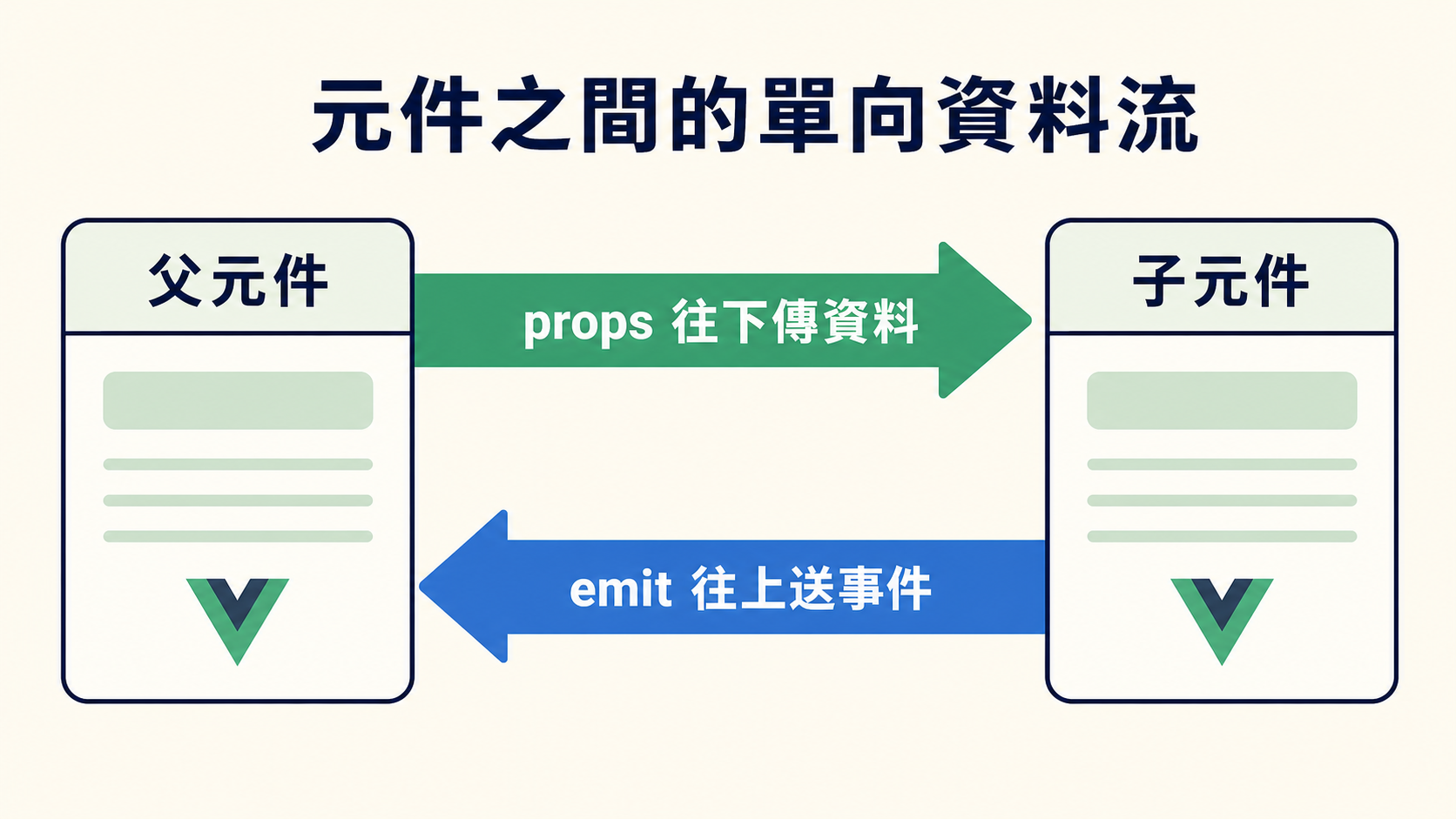
props 的資料流向是單向的:父元件流向子元件。父元件更新,子元件的 props 跟著更新;反過來不成立,子元件不應該修改 props。
常見錯誤:直接修改 props
「售出一本,庫存減一」,直覺可能會在子元件裡這樣寫:
function sell() {
  props.stock--   // 開發模式下 console 會警告,而且父元件的資料不會變
}props 是唯讀的:像上面這樣直接對 prop 賦值,開發模式下 console 會警告,父元件的資料也不會變。
物件與陣列不同,prop 傳的是參照。子元件修改 props.book.stock 時,Vue 不會攔截,父元件手上的同一個物件也會跟著改。程式看似能跑,但之後要追查「這筆資料在哪裡被改動」就麻煩了。
正確的做法依需求二選一:
computed,例如 const localStock = ref(props.stock) 或 const label = computed(() => props.title.toUpperCase())。簡單記:資料由父元件擁有,就由父元件修改;子元件只負責回報事件。
前一節才說過「解構 reactive() 的原始型別屬性會中斷響應性」,而 defineProps() 回傳的 props 物件也是響應式的,那解構 props 也會斷嗎?
在 Vue 3.5 之前會,所以舊程式碼都乖乖寫 props.title。Vue 3.5 之後,在同一個 <script setup> 裡解構 defineProps() 可以保持響應性,還能順便宣告預設值:
src/components/BookCard.vue:
<script setup>
// 解構同時宣告預設值,響應性由編譯器維持
const { title, stock = 0 } = defineProps({
  title: { type: String, required: true },
  stock: Number
})
</script>

<template>
  <article class="card">
    <h2>{{ title }}</h2>
    <p>剩餘 {{ stock }} 本</p>
  </article>
</template>

<style scoped>
.card {
  border: 1px solid #cbd5e1;
  border-radius: 8px;
  padding: 1rem;
}
</style>stock = 0 取代了驗證物件裡的 default: 0,寫起來就是普通的 JavaScript 解構預設值。
不過要知道它為什麼能成立:這是 defineProps() 專屬的編譯器轉換。編譯器看得到同一個 <script setup> 裡的 title 來自 defineProps 的解構,會在編譯時把它自動改寫回 props.title。它不是新的響應式機制,一般物件與 reactive() 的解構行為完全沒有改變,上一節的規則依然成立。
也因為是編譯期改寫,離開編譯器看得到的範圍就要留意:把解構出來的 prop 傳給 watch,或傳給需要持續追蹤變化的外部函式/composable 時,要包成 getter:
watch(stock, () => { /* ... */ })          // 錯誤:傳給 watch 的是當下的數字
watch(() => stock, () => { /* ... */ }) // 正確:包成 getter,watch 才追蹤得到如果函式只是要拿當下的值做一次性計算,直接傳值即可,不必包 getter。
輸入解決了,來處理輸出。整條鏈路有三個環節:子元件用 defineEmits() 宣告會發出哪些事件,需要時呼叫 emit 往上送,父元件用 @事件名(完整寫法是 v-on:事件名)接聽。先看完整範例再逐步拆解。BookCard.vue 大部分是上一小節的程式碼,新的只有 <script setup> 裡的 defineEmits 與 handleClick,以及模板裡的庫存顯示與購買按鈕:
src/components/BookCard.vue:
<script setup>
const { title, stock = 0 } = defineProps({
  title: { type: String, required: true },
  stock: Number
})

const emit = defineEmits(['purchase'])

function handleClick() {
  emit('purchase', title)   // 事件名稱+要附給父元件的資料
}
</script>

<template>
  <article class="card">
    <h2>{{ title }}</h2>
    <p v-if="stock > 0">剩餘 {{ stock }} 本</p>
    <p v-else>已售完</p>
    <button type="button" :disabled="stock === 0" @click="handleClick">
      購買
    </button>
  </article>
</template>

<style scoped>
.card {
  border: 1px solid #cbd5e1;
  border-radius: 8px;
  padding: 1rem;
}
</style>父元件這邊,這次把書目收進自己的狀態,再擺一台簡易購物車。上一小節說「售出一本,庫存減一」要由擁有資料的父元件來改,就在 handlePurchase 裡兌現:庫存減一、購物車加一;購物車上的「移除」按鈕則反過來,把數量還回庫存:
src/App.vue:
<script setup>
import { computed, ref } from 'vue'
import BookCard from './components/BookCard.vue'

const books = ref([
  { title: '重新認識 Vue.js', stock: 8, inCart: 0 },
  { title: '008 天絕對看不完', stock: 2, inCart: 0 }
])
const cartItems = computed(() => books.value.filter((book) => book.inCart > 0))

function handlePurchase(bookTitle) {
  // 參數就是子元件 emit 時附上的資料
  const book = books.value.find((book) => book.title === bookTitle)
  book.stock--
  book.inCart++
}

function handleRemove(book) {
  book.inCart--
  book.stock++
}
</script>

<template>
  <main class="app">
    <BookCard
      v-for="book in books"
      :key="book.title"
      :title="book.title"
      :stock="book.stock"
      @purchase="handlePurchase"
    />
    <section>
      <h2>購物車</h2>
      <p v-if="cartItems.length === 0">購物車是空的</p>
      <ul v-else>
        <li v-for="book in cartItems" :key="book.title">
          《{{ book.title }}》× {{ book.inCart }}
          <button type="button" @click="handleRemove(book)">移除</button>
        </li>
      </ul>
    </section>
  </main>
</template>

<style scoped>
.app {
  display: grid;
  gap: 1rem;
  padding: 2rem;
}
</style>剩餘 8 本
剩餘 2 本
購物車是空的
按下「購買」之後發生了什麼事?順著事件的旅程,把三個環節各自對回程式碼:
defineEmits(['purchase']) 列出這個元件會發出哪些事件。作用跟 defineProps() 一樣是介面說明,props 宣告輸入、emits 宣告輸出。更重要的是它的回傳值:一個專門用來發送事件的函式。變數取名 emit 只是慣例,不是特殊關鍵字。handleClick() 呼叫 emit('purchase', title)。第一個參數是事件名稱,對應宣告陣列裡的 'purchase',所以同一個名字會出現兩次:一次宣告、一次發送。第二個參數起,是要附給父元件的資料。@purchase="handlePurchase" 收到事件,handlePurchase(bookTitle) 的參數 bookTitle 就是子元件 emit 時附上的 title。也就是說,emit 的第二個參數,會變成父元件 handler 的第一個參數。順帶一提,模板裡直接寫 @click="emit('purchase', title)" 也能動,但只要發送前多一點邏輯(例如先檢查庫存),還是得搬回函式,所以本書習慣一開始就包成具名函式。
最後注意分工,試著在上面的範例操作看看:連按「購買」,庫存遞減、購物車數量同步增加,庫存歸零的瞬間按鈕自己變成不能按;再按「移除」把書退回,售完的卡片又活了過來。整個過程 BookCard.vue 完全沒有修改庫存,它只負責回報「發生了什麼事」;在庫存與購物車之間搬動數量的,都是擁有資料的父元件。
兩顆按鈕正好走了兩條路:「購買」在子元件裡,得靠 emit 把事件送上來;「移除」是父元件自己模板上的按鈕,直接呼叫 handleRemove 就好,完全不經過子元件。但不管走哪條路,改的都是父元件的資料,改完之後新的 stock 順著 props 流回 BookCard,畫面跟著更新。這正是上一小節單向資料流的完整樣貌:props 往下、events 往上。
自訂事件的寫法跟 DOM 事件一致,行為卻有幾個關鍵差異:
emit 附上的資料,沒有 event 物件,自然也沒有 preventDefault() 可言,上一章的事件修飾子在這裡也多半用不到。emit('addToCart')),父元件模板可以用 kebab-case 監聽(@add-to-cart),Vue 會自動轉換,這也是模板裡慣用的寫法。TypeScript 版本:用型別宣告 emits
defineEmits 同樣可以用型別參數,宣告每個事件的參數型別:
<script setup lang="ts">
const emit = defineEmits<{
  purchase: [title: string]
}>()
</script>同樣地,細節留給第九章。
props 搭配 emits,已經能應付大多數的父子溝通。不過有一種模式常見到 Vue 特地為它做了專屬語法:子元件要「借用並回寫」父元件的一筆資料,也就是元件版的 v-model。下一節就來看。