Appearance
條件與列表渲染

畫面通常不會永遠長一樣。有些區塊要在特定狀態才出現,有些資料則要用列表呈現。Vue 用 v-if、v-show 處理條件,用 v-for 處理列表。
v-if、v-else-if、v-else
v-if 會依條件決定是否渲染某段 DOM。下面可以調整分數,觀察三個條件分支如何切換;90 分以上的分支會一次控制兩段相鄰訊息:
vue
<script setup>
import { ref } from 'vue'

const score = ref(82)
</script>

<template>
  <main class="app">
    <label>
      分數
      <input v-model.number="score" type="number" min="0" max="100">
    </label>

    <template v-if="score >= 90">
      <p>表現優秀</p>
      <p>已達成進階學習門檻。</p>
    </template>
    <p v-else-if="score >= 60">已經及格</p>
    <p v-else>需要再練習</p>
  </main>
</template>

<style scoped>
.app {
  padding: 2rem;
}
</style>已經及格
輸入 90 分以上時,畫面會建立該分支的兩段訊息;輸入 60 到 89 分或 59 分以下時,則只建立對應的單一訊息。<template> 只負責把多個相鄰元素分成一組,本身不會產生額外 DOM。當條件不成立時,該分支的元素不會被建立。這很適合用在「有時候根本不需要存在」的內容,例如權限不足提示、尚未載入完成的區塊。
v-show
v-show 也能控制顯示與否,但它不會移除 DOM,而是切換 CSS 的 display:
vue
<script setup>
import { ref } from 'vue'

const isOpen = ref(false)

function toggle() {
  isOpen.value = !isOpen.value
}
</script>

<template>
  <main class="app">
    <button type="button" @click="toggle">
      切換說明
    </button>

    <p v-show="isOpen" class="panel">
      這段內容會保留在 DOM 裡,只是顯示或隱藏。
    </p>
  </main>
</template>

<style scoped>
.app {
  padding: 2rem;
}

.panel {
  margin-top: 1rem;
}
</style>簡單判斷方式是:
| 指令 | 適合情境 |
|---|---|
v-if | 條件很少切換,或內容建立成本較高。 |
v-show | 內容需要頻繁顯示/隱藏。 |
用 v-for 渲染列表
列表渲染會把陣列中的每個項目變成一段模板:
vue
<script setup>
import { ref } from 'vue'

const todos = ref([
  { id: 1, text: '建立 Vite 專案', done: true },
  { id: 2, text: '認識模板語法', done: true },
  { id: 3, text: '練習列表渲染', done: false }
])
</script>

<template>
  <main class="app">
    <ul class="todo-list">
      <li v-for="todo in todos" :key="todo.id">
        <label>
          <input v-model="todo.done" type="checkbox">
          <span :class="{ done: todo.done }">{{ todo.text }}</span>
        </label>
      </li>
    </ul>
  </main>
</template>

<style scoped>
.app {
  padding: 2rem;
}

.todo-list {
  padding-left: 1.25rem;
}

.done {
  color: #64748b;
  text-decoration: line-through;
}
</style>v-for="todo in todos" 會逐一取出 todos 裡的項目。:key="todo.id" 則是告訴 Vue:每個項目的穩定識別值是什麼。
key 不是列表編號,而是資料的身分證
第一次看到 key,很容易把它當成「這是第幾筆」。但順序只是項目現在站的位置,並不是項目本身的身分。先記住這句話:index 代表位置,id 代表資料身分。
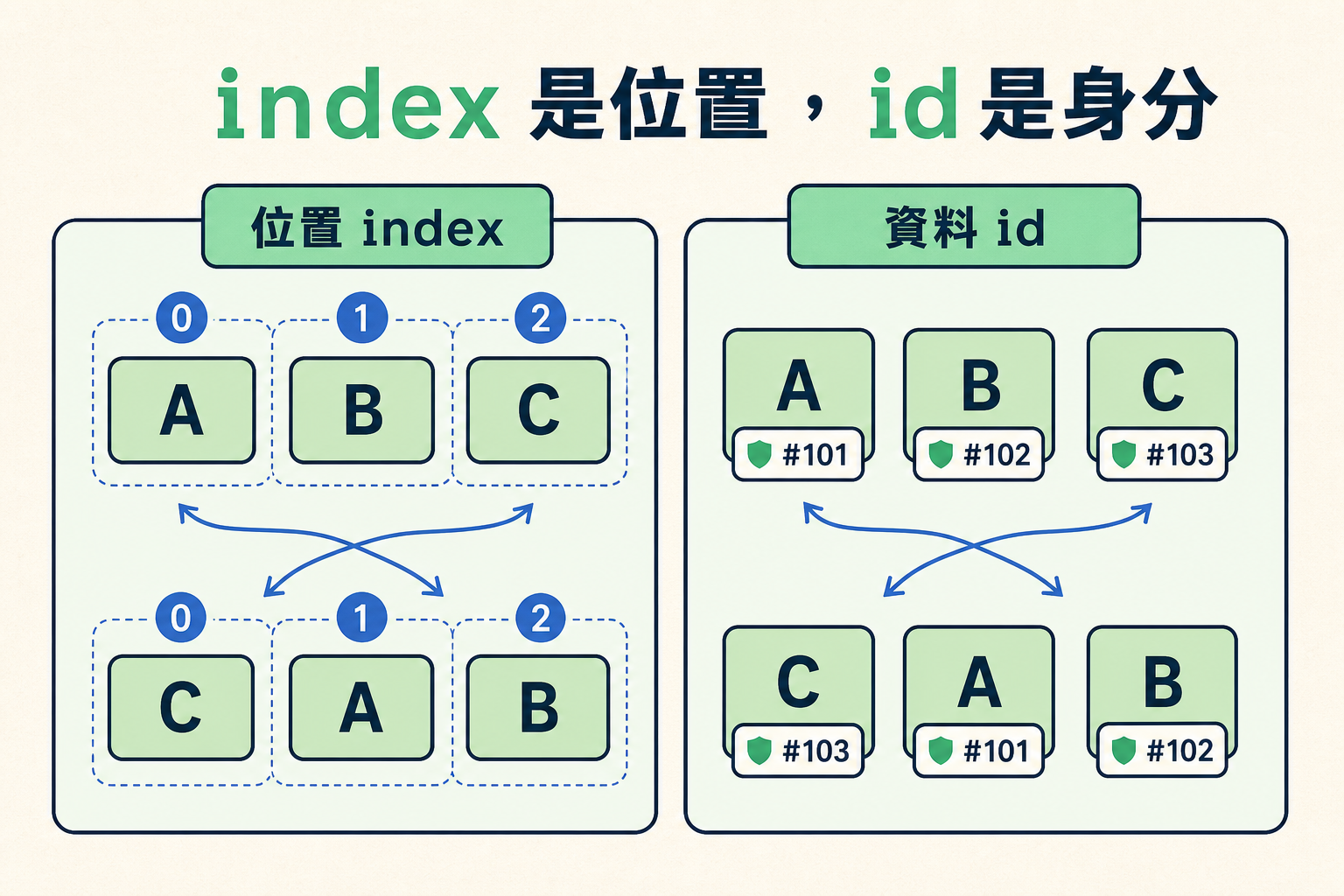
圖中的 0、1、2 像是固定的座位號碼;A、B、C 則是坐在座位上的資料。重新排序時,資料會換座位,但每筆資料自己的 id 不會因此改變。這也是 :key="todo.id" 比 :key="index" 更能代表項目的原因。
Vue 更新列表時,預設會盡量在原位置修改現有的 DOM。純文字列表通常看不出問題,因為文字改掉就好了;但輸入框裡尚未存回資料的文字、游標位置等 DOM 暫存狀態,仍然留在原本的節點上。提供穩定的 key 之後,Vue 才能知道某個 DOM 節點屬於哪一筆資料,並在排序改變時讓節點與狀態一起移動。
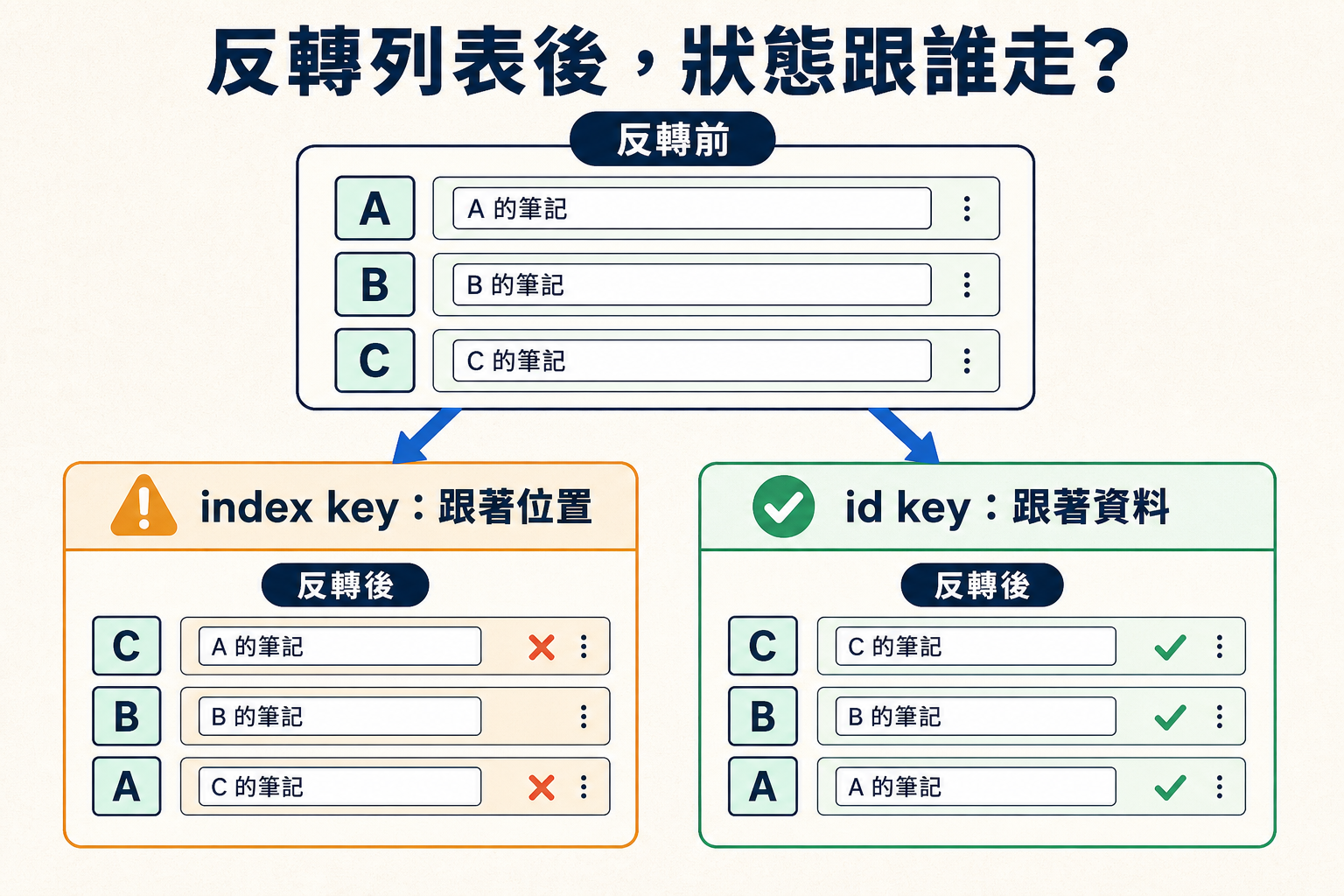
左邊使用 index 時,第一列雖然已經顯示資料 C,輸入框卻仍保留原本第一列 A 的筆記;右邊使用 id 時,C 的 DOM 節點與「C 的筆記」會一起移到第一列。Vue 判斷「更新前後是否為同一筆資料」的線索,就是 key。
假設列表原本是 A、B、C,接著把順序反轉成 C、B、A:
| 反轉後 | 用 index 當 key | 用資料 id 當 key |
|---|---|---|
| 第一列 | key=0 的節點原本屬於 A,現在被拿來顯示 C;節點裡的暫存狀態可能仍是 A 的 | key=C 的節點從第三列移到第一列,C 的暫存狀態跟著移動 |
| Vue 判斷依據 | 「這個位置還在」 | 「這筆資料還在,只是換了位置」 |
| 結果 | DOM 狀態可能跟錯資料 | DOM 狀態跟著資料身分走 |
下面的範例故意不對輸入框使用 v-model,讓輸入內容只暫存在 DOM 裡。先在左右兩欄的輸入框打入不同文字,再按「反轉排序」或「刪除第一筆」,比較兩欄的差異:
vue
<script setup>
import { ref } from 'vue'

const initialTodos = [
  { id: 'A', text: '買牛奶' },
  { id: 'B', text: '讀 Vue' },
  { id: 'C', text: '寫筆記' }
]

const todos = ref(initialTodos.map(todo => ({ ...todo })))
const demoVersion = ref(0)

function reverseTodos() {
  todos.value.reverse()
}

function removeFirst() {
  todos.value.shift()
}

function resetTodos() {
  todos.value = initialTodos.map(todo => ({ ...todo }))
  demoVersion.value++
}
</script>

<template>
  <main class="app">
    <p>先在兩欄輸入一些暫存文字,再改變列表順序。</p>

    <div class="actions">
      <button
        type="button"
        :disabled="todos.length < 2"
        @click="reverseTodos"
      >
        反轉排序
      </button>
      <button
        type="button"
        :disabled="todos.length === 0"
        @click="removeFirst"
      >
        刪除第一筆
      </button>
      <button type="button" @click="resetTodos">
        重設
      </button>
    </div>

    <div :key="demoVersion" class="comparison">
      <section class="list-panel list-panel--wrong">
        <h3>用 index 當 key</h3>
        <ul>
          <li v-for="(todo, index) in todos" :key="index">
            <strong>{{ todo.id }}:{{ todo.text }}</strong>
            <label>
              暫存內容
              <input type="text" placeholder="這筆的 DOM 暫存內容">
            </label>
          </li>
        </ul>
      </section>

      <section class="list-panel list-panel--correct">
        <h3>用 id 當 key</h3>
        <ul>
          <li v-for="todo in todos" :key="todo.id">
            <strong>{{ todo.id }}:{{ todo.text }}</strong>
            <label>
              暫存內容
              <input type="text" placeholder="這筆的 DOM 暫存內容">
            </label>
          </li>
        </ul>
      </section>
    </div>
  </main>
</template>

<style scoped>
.app {
  padding: 2rem;
}

.actions {
  display: flex;
  flex-wrap: wrap;
  gap: 0.75rem;
  margin-bottom: 1rem;
}

.comparison {
  display: grid;
  grid-template-columns: repeat(2, minmax(0, 1fr));
  gap: 1rem;
}

.list-panel {
  border: 1px solid #cbd5e1;
  border-radius: 8px;
  padding: 1rem;
}

.list-panel--wrong {
  border-color: #f59e0b;
}

.list-panel--correct {
  border-color: #10b981;
}

.list-panel h3 {
  margin-top: 0;
}

.list-panel ul {
  display: grid;
  gap: 0.75rem;
  margin: 0;
  padding: 0;
  list-style: none;
}

.list-panel li {
  display: grid;
  gap: 0.5rem;
}

.list-panel label {
  display: grid;
  gap: 0.25rem;
}

@media (max-width: 640px) {
  .comparison {
    grid-template-columns: 1fr;
  }
}
</style>先在兩欄輸入一些暫存文字,再改變列表順序。
用 index 當 key
- A:買牛奶
- B:讀 Vue
- C:寫筆記
用 id 當 key
- A:買牛奶
- B:讀 Vue
- C:寫筆記
使用 index 的左欄,DOM 節點留在原位置,所以輸入內容可能跑到另一筆資料旁邊;使用 id 的右欄,DOM 節點會跟著 A、B、C 的身分移動或被移除。這就是「畫面文字看似正確,但操作狀態對錯項目」的具體情況。
常見錯誤:沒有加 key,或用 index 當 key
v-for 應該搭配穩定且唯一的 key,通常就是資料庫 id 或其他不會隨排序改變的識別值。key 應使用字串或數字等原始型別,不要傳入整個物件。
如果省略 key,或直接用陣列 index,當列表新增、刪除、重新排序時,畫面狀態可能對錯項目。Math.random() 也不是解法:它每次渲染都產生不同的值,Vue 會把所有節點當成全新的項目,原本狀態同樣保不住。
html
<li v-for="todo in todos">
  {{ todo.text }}
</li>

<li v-for="(todo, index) in todos" :key="index">
  {{ todo.text }}
</li>

<li v-for="todo in todos" :key="Math.random()">
  {{ todo.text }}
</li>

<li v-for="todo in todos" :key="todo.id">
  {{ todo.text }}
</li>能使用資料本身的 id 時,就不要用 index 當 key。只有在列表永遠不會新增、刪除或重新排序,而且內容沒有輸入框或其他需要保留狀態的元素時,index 才不容易造成問題;實務上仍建議預設使用穩定 id。
取得 index
如果畫面真的需要顯示第幾項,可以在 v-for 取出 index:
vue
<script setup>
import { ref } from 'vue'

const chapters = ref([
  { id: 'ch1', title: '現代開發環境' },
  { id: 'ch2', title: 'Vue 基礎心智' },
  { id: 'ch3', title: 'SFC 與 script setup' }
])
</script>

<template>
  <main class="app">
    <ol>
      <li v-for="(chapter, index) in chapters" :key="chapter.id">
        {{ index + 1 }}. {{ chapter.title }}
      </li>
    </ol>
  </main>
</template>

<style scoped>
.app {
  padding: 2rem;
}
</style>這裡可以使用 index 顯示順序,但 key 仍然使用 chapter.id。這兩件事不要混在一起。
用數字範圍重複固定次數
v-for 的右側不一定要是陣列,也可以直接給一個整數。Vue 會把它當成數字範圍,重複渲染指定的次數:
vue
<script setup>
import { ref } from 'vue'

const totalPages = 5
const currentPage = ref(1)
</script>

<template>
  <main class="range-demo">
    <nav class="pagination" aria-label="範例頁碼">
      <button
        v-for="page in totalPages"
        :key="page"
        type="button"
        :class="{ active: page === currentPage }"
        @click="currentPage = page"
      >
        {{ page }}
      </button>
    </nav>

    <p>目前在第 {{ currentPage }} 頁</p>
  </main>
</template>

<style scoped>
.range-demo {
  padding: 2rem;
}

.pagination {
  display: flex;
  gap: 0.5rem;
}

.active {
  font-weight: 700;
  outline: 2px solid #42b883;
}
</style>目前在第 1 頁
這裡的 page 會依序得到 1、2、3、4、5,不是從 0 開始。因為每個數字在這個固定範圍內都是唯一且穩定的,所以可以直接使用 :key="page"。
數字範圍適合頁碼、星等、骨架畫面或其他「重複固定次數」的介面。如果每一項背後都有名稱、id 或其他資料,仍應該準備物件陣列,再用一般的 v-for 迭代資料。
不要在同一個元素混用 v-if 和 v-for
如果要顯示未完成的待辦事項,直覺可能會寫成這樣:
html
<!-- 錯誤示範:這段程式碼無法運作 -->
<li v-for="todo in todos" v-if="!todo.done" :key="todo.id">
  {{ todo.text }}
</li>這不只是可讀性問題,而是根本跑不起來:當 v-if 和 v-for 出現在同一個元素上時,v-if 的優先權比 v-for 高,會先被執行。這時 v-for 還沒開始跑,todo 這個變數根本不存在,判斷 !todo.done 就會出錯。
正確的做法,是先用 computed 算出要顯示的資料,再讓模板專心渲染:
vue
<script setup>
import { computed, ref } from 'vue'

const todos = ref([
  { id: 1, text: '建立 Vite 專案', done: true },
  { id: 2, text: '認識模板語法', done: true },
  { id: 3, text: '練習列表渲染', done: false }
])

const undoneTodos = computed(() =>
  todos.value.filter(todo => !todo.done)
)
</script>

<template>
  <main class="app">
    <p v-if="undoneTodos.length === 0">所有事情都完成了。</p>

    <ul v-else>
      <li v-for="todo in undoneTodos" :key="todo.id">
        {{ todo.text }}
      </li>
    </ul>
  </main>
</template>

<style scoped>
.app {
  padding: 2rem;
}
</style>到這裡問題已經很清楚:模板負責顯示列表,篩選結果則交給 computed。下一節就來看看它怎麼運作。