Appearance
computed 與 watch
前面幾節我們已經能顯示資料、處理事件、渲染列表。接著要看兩個很常用、也很容易混淆的工具:computed 與 watch。
簡單來說,computed 用來產生「由既有資料推導出的結果」;watch 用來在資料變動時執行副作用,例如呼叫 API、寫入 localStorage 或記錄分析事件。
用 computed 表示衍生資料
假設我們有一份待辦清單,畫面上要顯示未完成項目數量。這個數字不應該另外手動維護,因為它可以從 todos 推導出來:
vue
<script setup>
import { computed, ref } from 'vue'

const todos = ref([
  { id: 1, text: '建立 Vite 專案', done: true },
  { id: 2, text: '認識響應式資料', done: true },
  { id: 3, text: '練習 computed', done: false }
])

const remainingCount = computed(() =>
  todos.value.filter(todo => !todo.done).length
)
</script>

<template>
  <main class="app">
    <p>還有 {{ remainingCount }} 件事尚未完成。</p>

    <ul>
      <li v-for="todo in todos" :key="todo.id">
        {{ todo.text }}
      </li>
    </ul>
  </main>
</template>

<style scoped>
.app {
  padding: 2rem;
}
</style>remainingCount 會依賴 todos。只要 todos 改變,Vue 就知道這個 computed 結果需要重新計算。
computed vs methods
同樣的結果,也可以寫成函式:
js
function getRemainingCount() {
  return todos.value.filter(todo => !todo.done).length
}差異在於:computed 會根據依賴快取結果。只要 todos 沒變,重複讀取 remainingCount 不會重新計算;methods 則是每次呼叫都會執行一次。
實務上可以這樣判斷:
| 情境 | 建議 |
|---|---|
| 要把既有資料推導成另一個值,並在模板中重複使用 | 用 computed |
| 使用者操作時要執行一段動作 | 用 function |
| 要因資料變化而做副作用 | 用 watch |
computed 預設是 readonly value
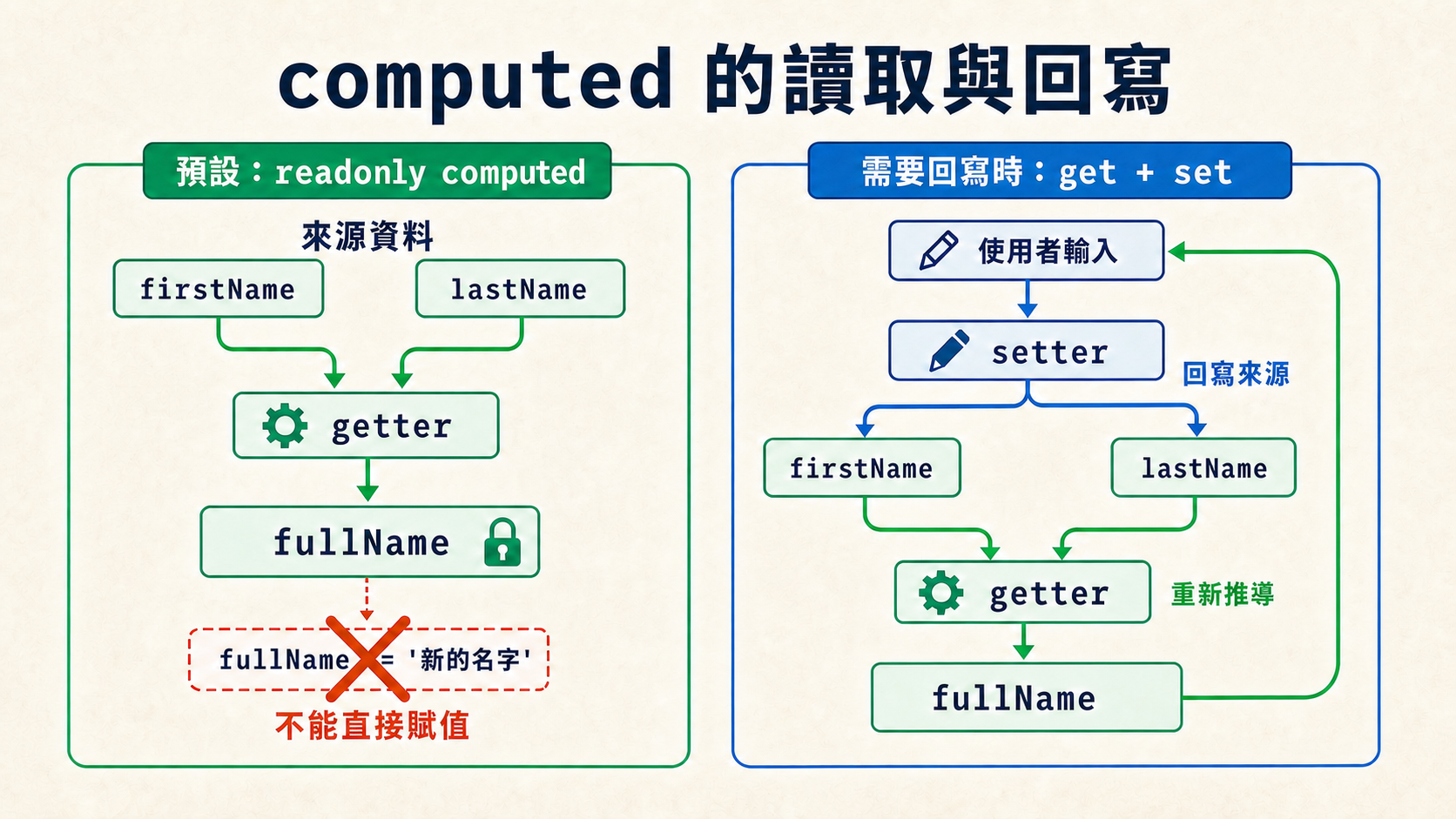
computed() 產生的是一個衍生值:它的內容由其他響應式資料計算而來,不是另一份應該手動維護的狀態。因此,使用函式建立的 computed 預設是 readonly value,只能讀取,不能直接對它賦值:
js
const fullName = computed(() => `${firstName.value} ${lastName.value}`)

fullName.value = 'Grace Hopper' // 寫入失敗:readonly computed這裡的 readonly 只是在限制「不能直接寫入 computed」,不代表來源資料被鎖住。只要 firstName 或 lastName 改變,fullName 還是會自動重新計算。開發模式下若嘗試寫入,Vue 會發出 computed readonly 的警告,而且衍生值不會因此更新。
大部分 computed 都應該維持這種唯讀關係:來源資料負責保存狀態,computed 負責讀取並推導結果。
需要回寫時:computed 的 getter 與 setter
前面的 computed(() => ...) 其實是在提供 getter:當程式讀取 computed 的值時,getter 會從來源資料計算並回傳結果。
少數情況下,畫面需要把衍生結果當成可編輯介面。例如輸入框顯示完整姓名,但真正的來源資料仍分開儲存在 firstName 與 lastName。這時若能清楚定義「完整姓名被修改後,要如何回寫來源資料」,就可以傳入包含 get 與 set 的物件,建立 writable computed:
vue
<script setup>
import { computed, ref } from 'vue'

const firstName = ref('Ada')
const lastName = ref('Lovelace')

const fullName = computed({
  get() {
    return `${firstName.value} ${lastName.value}`.trim()
  },
  set(newValue) {
    const [first = '', ...rest] = newValue.trim().split(/\s+/)
    firstName.value = first
    lastName.value = rest.join(' ')
  }
})
</script>

<template>
  <main class="app">
    <label>
      完整姓名
      <input v-model="fullName" type="text">
    </label>

    <p>firstName:{{ firstName }}</p>
    <p>lastName:{{ lastName }}</p>
  </main>
</template>

<style scoped>
.app {
  padding: 2rem;
}
</style>firstNameAda
lastNameLovelace
修改輸入框 → setter 拆分姓名 → 更新來源資料 → getter 重新組合
讀取 fullName 時會執行 getter,把兩個來源值組合起來;修改輸入框時,v-model 會把新值交給 setter,setter 再拆開並回寫 firstName、lastName。來源資料改變後,getter 會重新計算完整姓名。
換句話說,setter 不是直接修改 computed 的快取,而是定義「有人想寫入這個衍生值時,應該如何更新真正的來源資料」。如果沒有合理的回寫規則,就不要為了讓 computed 可寫而硬加 setter。
computed getter 要保持純粹
computed 的 getter 應該只負責計算並回傳結果,不要在裡面修改其他狀態、呼叫 API 或操作 DOM。
常見錯誤:在 computed 裡做副作用或忘記 return
下面這兩種寫法都容易出問題:
js
const total = computed(() => {
  console.log('重新計算') // 不建議:computed 應避免副作用
  todos.value.length      // 錯誤:沒有 return,結果會是 undefined
})沒有 return 的問題很直接:getter 回傳 undefined,total 的值就永遠是 undefined。
副作用的問題則出在執行時機:computed 有快取,而且採惰性計算。依賴改變時,Vue 只會先把快取標記為需要更新;要等到下一次有人讀取這個 computed 的值,getter 才會重新執行。所以 getter 並不是「資料一變就會觸發的 callback」。
這代表放在 getter 裡的 console.log、API 呼叫等動作,會變成「有時發生、有時不發生」,出問題時很難追查;如果是在 getter 裡修改其他響應式資料,還可能牽動其他 computed 跟著重算,讓資料流變得難以預測。
比較好的寫法是讓 computed 專心回傳結果:
js
const total = computed(() => todos.value.length)如果真的需要在資料變動時執行副作用,請改用 watch。
用 watch 觀察資料變化
watch 適合用在「資料變了,所以要做某件事」的場景。下面範例會在關鍵字改變時更新提示文字:
vue
<script setup>
import { ref, watch } from 'vue'

const keyword = ref('')
const message = ref('請輸入關鍵字')

watch(keyword, (newKeyword, oldKeyword) => {
  if (newKeyword === '') {
    message.value = '請輸入關鍵字'
    return
  }

  message.value = `從「${oldKeyword}」改成「${newKeyword}」`
})
</script>

<template>
  <main class="app">
    <input v-model="keyword" type="search" placeholder="搜尋">
    <p>{{ message }}</p>
  </main>
</template>

<style scoped>
.app {
  padding: 2rem;
}
</style>請輸入關鍵字
watch(source, callback) 的第一個參數是要觀察的資料來源,第二個參數會在資料變動時執行。callback 可以取得新值與舊值。
停止觀察:unwatch()
watch() 會回傳一個停止函式。把它存進變數後呼叫,就能提早停止這個 watcher:
vue
<script setup>
import { ref, watch } from 'vue'

const count = ref(0)
const triggeredCount = ref(0)
const isWatching = ref(true)

const unwatch = watch(count, () => {
  triggeredCount.value++
})

function stopWatching() {
  unwatch()
  isWatching.value = false
}
</script>

<template>
  <main class="app">
    <p>count:{{ count }}</p>
    <p>watch 觸發次數:{{ triggeredCount }}</p>
    <p>狀態:{{ isWatching ? '觀察中' : '已停止' }}</p>

    <button type="button" @click="count++">
      count + 1
    </button>
    <button type="button" :disabled="!isWatching" @click="stopWatching">
      執行 unwatch()
    </button>
  </main>
</template>

<style scoped>
.app {
  padding: 2rem;
}
</style>count0
watch 觸發次數0
觀察狀態觀察中
改變 count 會觸發 watch。
這裡的 unwatch 只是變數名稱,不是另一個需要從 Vue import 的函式;它拿到的就是 watch() 回傳的停止函式。執行 unwatch() 後,count 本身仍然是響應式資料,畫面也會繼續更新,只是這個 watcher 的 callback 不再執行。
在 <script setup> 中同步建立的 watcher,元件卸載時 Vue 會自動停止;手動呼叫 unwatch() 主要用在元件還存在,但某段觀察已經不再需要的情況。停止之後若要再次觀察,必須重新呼叫 watch() 建立新的 watcher。
什麼時候不要用 watch?
如果只是要從既有資料算出另一個結果,通常不需要 watch。例如下面這種寫法,就是用 watch 手動維護衍生資料:
js
const firstName = ref('Ada')
const lastName = ref('Lovelace')
const fullName = ref('')

watch([firstName, lastName], ([newFirstName, newLastName]) => {
  fullName.value = `${newFirstName} ${newLastName}`
})這種情境改成 computed 會更清楚:
js
const fullName = computed(() => `${firstName.value} ${lastName.value}`)常見錯誤:該用 computed 卻用 watch
watch 很強大,但不要把它當成「資料加工工具」。只要結果可以由現有資料同步推導出來,先考慮 computed。
把 watch 留給副作用,程式會比較容易追蹤。
立即執行與深層觀察
建立時先執行:immediate: true
watch 預設會等資料第一次變動後才執行。如果建立 watcher 時就想先跑一次,可以加上 immediate: true:
js
watch(keyword, (newKeyword) => {
  message.value = newKeyword === ''
    ? '請輸入關鍵字'
    : `搜尋:${newKeyword}`
}, { immediate: true })immediate 處理的是「callback 第一次何時執行」;接下來的 deep 則處理「物件要觀察到多深」。兩者用途不同,也可以同時使用。
先理解深層觀察:deep: true
當 watch 的來源是裝著物件的 ref 時,預設只會觀察 .value 是否被換成另一個物件。直接修改內部屬性不會觸發 callback:
js
const profile = ref({
  name: 'Ada',
  settings: {
    theme: {
      color: 'blue'
    }
  }
})

watch(profile, () => {
  console.log('profile 改變了')
})

profile.value.settings.theme.color = 'red'
// profile.value 本身仍是同一個物件,所以不會觸發上面的 watch如果連巢狀屬性的修改都要觀察,就加入 { deep: true }:
js
watch(
  profile,
  (newProfile, oldProfile) => {
    console.log('顏色變成:', newProfile.settings.theme.color)
    console.log(newProfile === oldProfile) // true
  },
  { deep: true }
)

profile.value.settings.theme.color = 'red'
// deep: true 會觀察所有巢狀層級,因此 callback 會執行deep: true 會遍歷物件內所有可觀察的巢狀屬性。它不會複製一份修改前的物件,因此上面的深層修改發生時,newProfile 與 oldProfile 仍指向同一個物件;如果需要比較修改前後的內容,必須另外保存快照或只觀察真正需要的欄位。
可以先把三種模式整理成這張表:
| 設定 | 觀察範圍 |
|---|---|
省略 deep | 只在 ref 的 .value 被替換時觸發 |
deep: true | 遍歷所有巢狀層級 |
deep: 2 | 最多遍歷兩層(Vue 3.5+) |
物件很大或巢狀很深時,deep: true 的遍歷成本也會增加。理解完整的深層觀察後,就能看懂 Vue 3.5 為什麼加入數值深度。
watch 的 deep 支援數值深度(Vue 3.5 新增)
在 Vue 3.5 之後,deep 不只可以用 true 遍歷所有層級,也可以是數字,用來限制最多往下觀察幾層。以下面範例的 profile 為例,{ deep: 2 } 的觀察範圍只到第二層:
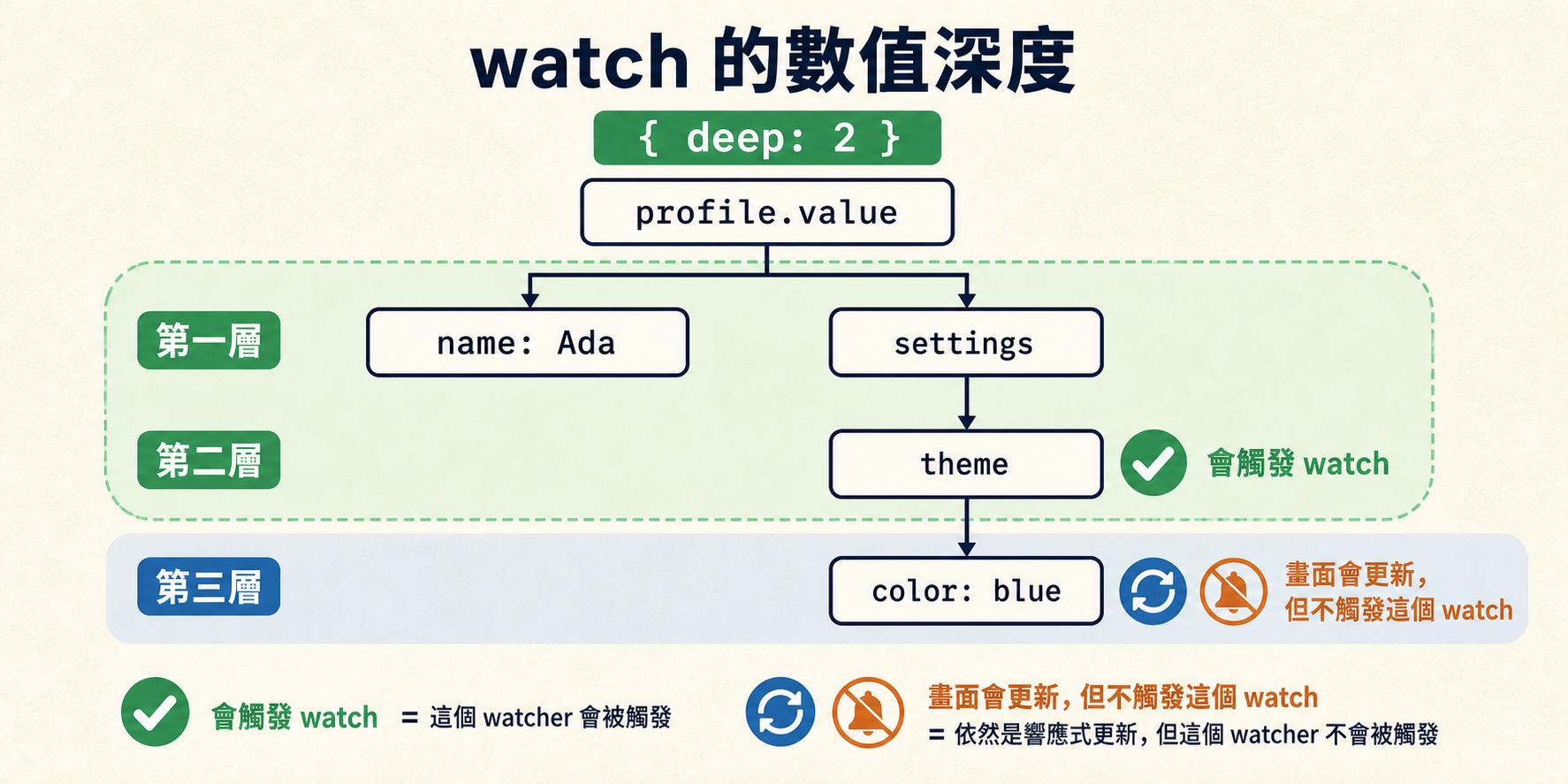
綠色範圍表示這個 watcher 最多會遍歷到第二層。第三層的 color 仍然是響應式資料,修改後畫面照樣更新;只是它超出這個 watcher 的遍歷範圍,所以不會觸發 callback。
vue
<script setup>
import { ref, watch } from 'vue'

const profile = ref({
  name: 'Ada',
  settings: {
    theme: {
      color: 'blue'
    }
  }
})

const triggeredCount = ref(0)
const resultMessage = ref('尚未操作,請選一種修改方式。')
const resultType = ref('idle')

watch(
  profile,
  () => {
    triggeredCount.value++
    resultMessage.value = '第二層的 theme 被替換,watch 已觸發。'
    resultType.value = 'triggered'
  },
  { deep: 2 }
)

function replaceTheme() {
  // theme 是第二層的屬性,仍在 deep: 2 的觀察範圍內
  profile.value.settings.theme = { color: 'green' }
}

function changeColor() {
  // color 位在第三層,超出 deep: 2 的範圍
  const currentColor = profile.value.settings.theme.color
  profile.value.settings.theme.color = currentColor === 'blue' ? 'red' : 'blue'
  resultMessage.value = '第三層的 color 已更新畫面,但沒有觸發這個 watch。'
  resultType.value = 'outside'
}
</script>

<template>
  <main class="deep-watch-demo">
    <header class="summary">
      <div class="metric">
        <span class="metric__label">目前顏色</span>
        <strong class="metric__value">
          <span
            class="color-dot"
            :style="{ backgroundColor: profile.settings.theme.color }"
            aria-hidden="true"
          />
          {{ profile.settings.theme.color }}
        </strong>
      </div>

      <div class="metric">
        <span class="metric__label">watch 觸發次數</span>
        <strong class="metric__value">{{ triggeredCount }}</strong>
      </div>
    </header>

    <p
      class="result"
      :class="`result--${resultType}`"
      role="status"
      aria-live="polite"
    >
      {{ resultMessage }}
    </p>

    <div class="actions">
      <section class="action-card action-card--inside">
        <span class="depth-badge">第二層・觀察範圍內</span>
        <h3 class="action-card__title">替換 theme 物件</h3>
        <p class="action-card__description">
          改動發生在 <code>deep: 2</code> 的邊界內,會觸發 watch。
        </p>
        <button type="button" @click="replaceTheme">
          換掉整組 theme
        </button>
      </section>

      <section class="action-card action-card--outside">
        <span class="depth-badge">第三層・觀察範圍外</span>
        <h3 class="action-card__title">修改 color 屬性</h3>
        <p class="action-card__description">
          響應式畫面仍會更新,但不會觸發這個 watch。
        </p>
        <button type="button" @click="changeColor">
          只改最深層的 color
        </button>
      </section>
    </div>
  </main>
</template>

<style scoped>
.deep-watch-demo {
  display: grid;
  gap: 1rem;
}

.summary,
.actions {
  display: grid;
  grid-template-columns: repeat(2, minmax(0, 1fr));
  gap: 0.75rem;
}

.metric,
.action-card {
  border: 1px solid #cbd5e1;
  border-radius: 10px;
  padding: 1rem;
}

.metric {
  display: grid;
  gap: 0.25rem;
}

.metric__label,
.action-card__description {
  color: #64748b;
}

.metric__value {
  display: flex;
  align-items: center;
  gap: 0.5rem;
  font-size: 1.25rem;
}

.color-dot {
  width: 0.875rem;
  height: 0.875rem;
  border-radius: 50%;
}

.result {
  margin: 0;
  border-left: 4px solid #94a3b8;
  padding: 0.75rem 1rem;
}

.result--triggered {
  border-left-color: #42b883;
}

.result--outside {
  border-left-color: #f59e0b;
}

.action-card {
  display: flex;
  flex-direction: column;
  align-items: flex-start;
  gap: 0.625rem;
}

.action-card--inside {
  border-color: #42b883;
}

.depth-badge {
  font-size: 0.75rem;
  font-weight: 700;
}

.action-card__title,
.action-card__description {
  margin: 0;
}

@media (max-width: 640px) {
  .summary,
  .actions {
    grid-template-columns: 1fr;
  }
}
</style>目前顏色 blue
watch 觸發次數0
尚未操作,請選一種修改方式。
替換 theme 物件
改動發生在 deep: 2 的邊界內,會觸發 watch。
修改 color 屬性
響應式畫面仍會更新,但不會觸發這個 watch。
{ deep: 2 } 的意思是最多往下遍歷兩層。實際按按鈕觀察:按「換掉整組 theme」時,改動發生在第二層,watch 觸發次數會加一;重複按「只改最深層的 color」時,顏色會在藍/紅之間切換,但改動發生在第三層,watch 不會觸發。
從這裡也可以看出,deep 只限制 watch 的觀察範圍,不影響響應式系統本身。數字深度比無限制的深層觀察更可控,但仍然要避免拿來觀察過大的資料結構。
小提醒:在 watch 裡發非同步請求要小心
當 watch 裡面發出非同步請求時,還會遇到「舊請求比新請求晚回來」的問題。Vue 3.5 的 onWatcherCleanup() 可以處理這類清理需求;這屬於 composables 與副作用管理的主題,第五章會有更完整的說明。